
Autofill job applications in Chrome.
ApplyShortly Form Assistant fills job applications from your saved profile and answers in your own browser, including sites where you’re already signed in.
100% free to install. No credit card required. Profile and saved-answer autofill are 100% free forever.
Get started in Chrome
Install and sign in
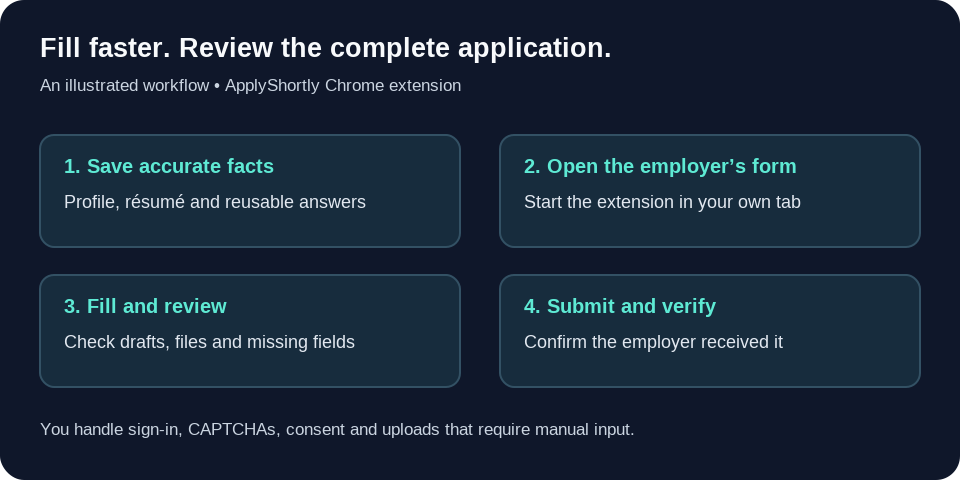
Add ApplyShortly Form Assistant from the Chrome Web Store and pin it. Sign in to ApplyShortly, open extension settings, and check that Connected as shows your account.
Save your profile and answers
Upload your résumé and confirm your basic profile details using the quick extension setup. Add reusable screening answers in your Answer Bank anytime.
Open a form and start applying
Open the employer’s application in Chrome, click the extension icon and choose Start applying. You can also start from an application’s browser option in ApplyShortly.
Review, complete and submit
Follow the chat for missing answers, check drafts and attachments, and complete any consent, login or CAPTCHA yourself. Submit on the employer’s page when ready and check for confirmation.
Already installed? Press Alt+Shift+F on an application form to start filling. Change the shortcut in Chrome’s extension shortcut settings.
Autofill and AI options
100% Free: Saved answers
Profile and answer-bank autofill are 100% free forever. No credit card or AI credits required.
ApplyShortly credits
Free plan includes monthly AI credits. Built-in models provide instant drafts with zero setup.
Your own API key
Choose OpenAI, Google Gemini, Anthropic Claude or a Custom URL in extension Settings → AI provider → Custom AI provider for direct provider billing.
Provider keys stay on this device and requests go directly to your provider. Custom provider mode does not fall back to credits automatically. If platform AI credits run out, the extension falls back to the rule-based engine so profile and answer-bank fills keep working.
Choose when to submit
Leaving Auto submit off lets you review and submit on the employer’s page. Turning on Auto submit authorizes a submission attempt after completeness checks and a three-second countdown you can cancel.
AI drafts can be submitted as filled. Read them first. Check the full guide for multi-step forms, uploads and submission verification.
Help for forms that need you
The chat can guide you through missing answers, popups and multi-step forms. You handle sign-in, CAPTCHAs, consent and file pickers that need manual input. Pause or take over whenever you need to.
Real employer applications are tracked automatically in ApplyShortly and outcomes sync back. If confirmation is missing, verify the employer’s result before recording it as submitted or trying again.
What to expect on an application form
Open a form, choose Start applying, inspect the filled details, and complete any unresolved questions. Forms vary: custom controls, embedded iframes, uploads and multi-step flows may need your input. The extension does not bypass sign-in or solve CAPTCHAs.
For an illustrated walkthrough of the workflow, read how to autofill job applications in Chrome. Keep the result in your application tracker and verify confirmation before retrying.
Ready to fill your first application?
The extension is open source under the MIT license.